# Page Contents
# Recording Requirements
Recording your matches correctly is the most important step in getting accurate, reliable breakdowns. Following these tips helps ensure your film processes smoothly and delivers the best results.
Indoor Focus Only
- Set your default angle to Tactical
- You can include Panoramic as an additional angle in addition to Tactical
Indoor Focus + Focus Point
- Set your default angle to Tactical
- Include your focus point as an additional angle
Focus Point Only
- Select Focus Point as your default angle
Additional Tips
- Create a separate event for each match
- Record separate events for your Freshman, JV, and Varsity teams on your Focus Camera
iOS Recording Requirements
Following these requirements helps ensure accurate AI tracking and smooth processing.
- Record from the middle of the back baseline on your team’s side (or as close as possible)
- Avoid obstacles such as line judges, spectators, or equipment*
- Frame the court correctly:
- All four corners of the opposite court should be visible
- Include the two far endline corners and the two corners under the antennae
- Use a tripod:
- Minimum height: 5 ft
- Recommended height: 8–10 ft
- Record in 1080p resolution at 30 or 60 fps
- Most newer devices default to these settings
- If unsure, search how to adjust recording settings for your device
- Maintain one continuous recording per set
- If using the mobile app, you may pause between sets
- Do not tap Save and Exit until the entire match is finished
- Record horizontally using a standard lens
- Do not zoom out
- Avoid wide-angle, fish-eye, or .5x lenses
- If livestreaming to Hudl and concerned about network stability, use a backup camera recording locally to the device
# Record and Upload from the App
Recording directly in the Hudl app is a simple way to capture high-quality film and streamline the upload process. This is the recommended option for livestreaming and is available exclusively on iOS devices.
- Download and open the Hudl app on your iOS device.
- Tap More at the bottom of the screen.
- Tap Record.
- Make sure Hudl has access to your camera and microphone in your phone’s settings.
- Select an event, or tap Continue.
- Press Record to begin filming.
- When finished, tap Save and Exit.
Record and Upload from the Hudl App
Need to upload a pre-recorded video?
If you recorded a match or practice footage outside of the Hudl app using your device's camera, you can upload videos directly from your camera roll into your library using the Hudl app.
# Upload from a Computer
- Select Upload.
- Select your video and click Upload.
- Pro Tip: Multiple videos can be merged into a single upload during the uploading process.
- Choose video details:
- Game
- Practice
- Scout
- Organize with the following selections:
- Scheduled event
- Video title
- Labels
# Setting Up Your Videos
Once the AI breaks down your video, a few setup steps help ensure everything processes correctly.
- College & Professional videos are automatically broken down upon upload. High School teams must submit their games to Hudl Assist for breakdown.
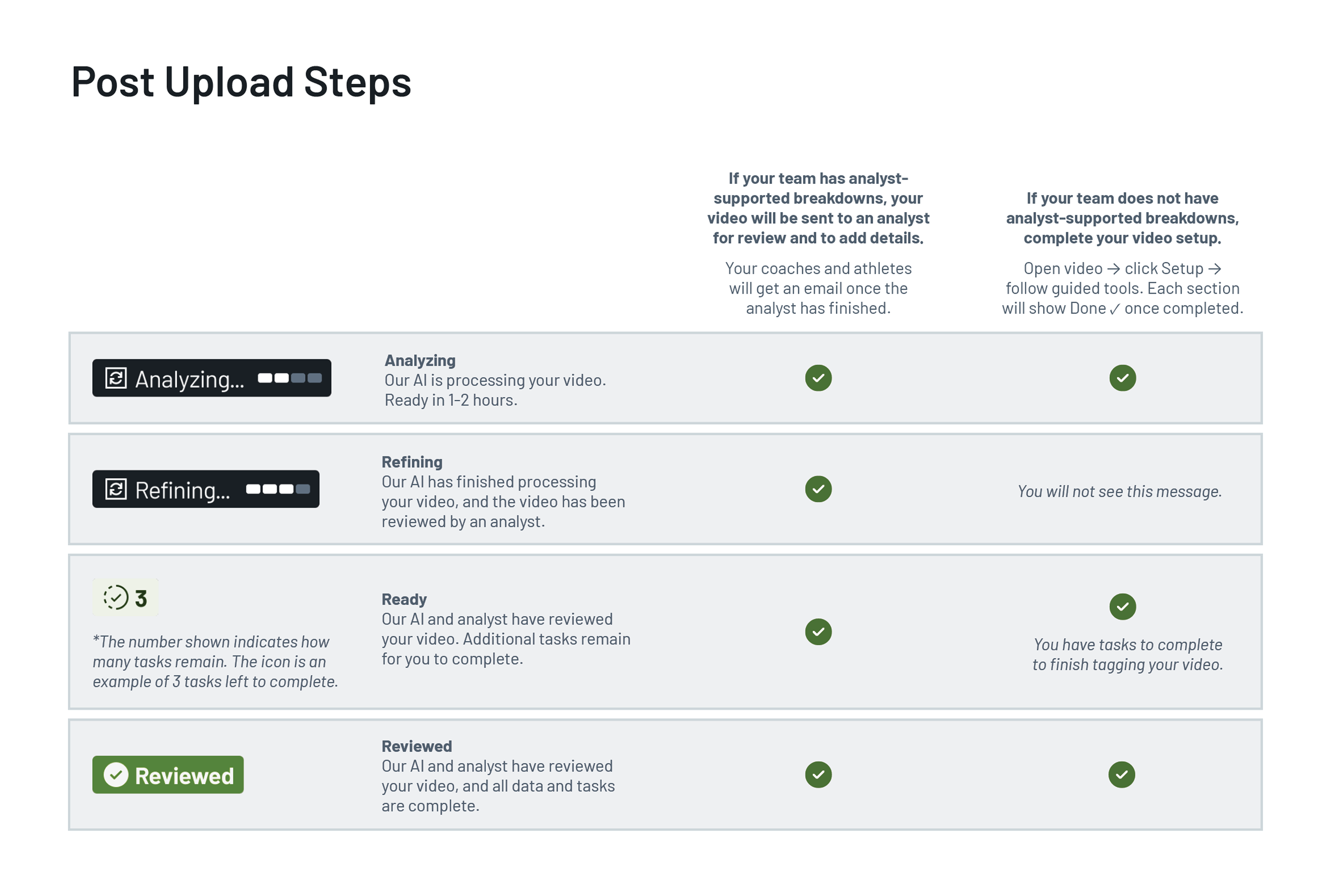
- How your video is processed: We’ll use AI to identify the vast majority of actions and players in your game footage. This also allows us to get more insights like ball trajectory and attack speed. After the AI processes the video our analysts will review the game to complete the breakdown. Like before, there may be some players we cannot identify. Rather than guess, we’ll flag these to you for review. At any point, the icons shown below will appear on your video in the library to let you know what’s happening.