High-quality breakdowns start with high-quality footage.
Recording for Tournaments
Important: High-quality breakdowns start with high-quality footage. Our AI relies on clear, consistent video to accurately track movement, read jersey numbers, and analyze positioning. Following the steps below will help ensure your film delivers reliable results throughout the tournament.
Tournament Prep
Preparing ahead of time helps prevent missed footage, upload delays and processing issues.
Grab a tripod and any additional hardware needed to mount your device
Charge your device in advance and pack an external battery or backup device
Confirm there’s enough storage available on your device
Plan for 2–3 GB per match
Choose how you’ll record your games:
Record via the Hudl app if you plan to livestream
Record to your camera roll if you don’t plan to livestream
Coordinate with your coach or club director to confirm you have the correct account access:
Coach accounts can livestream and upload directly from the Hudl app
Athlete accounts can record to their device and upload afterward
To enable athlete uploads, a director can log into Hudl and go to: Team → Team Settings → Access
Following these requirements helps ensure accurate AI tracking and smooth processing.
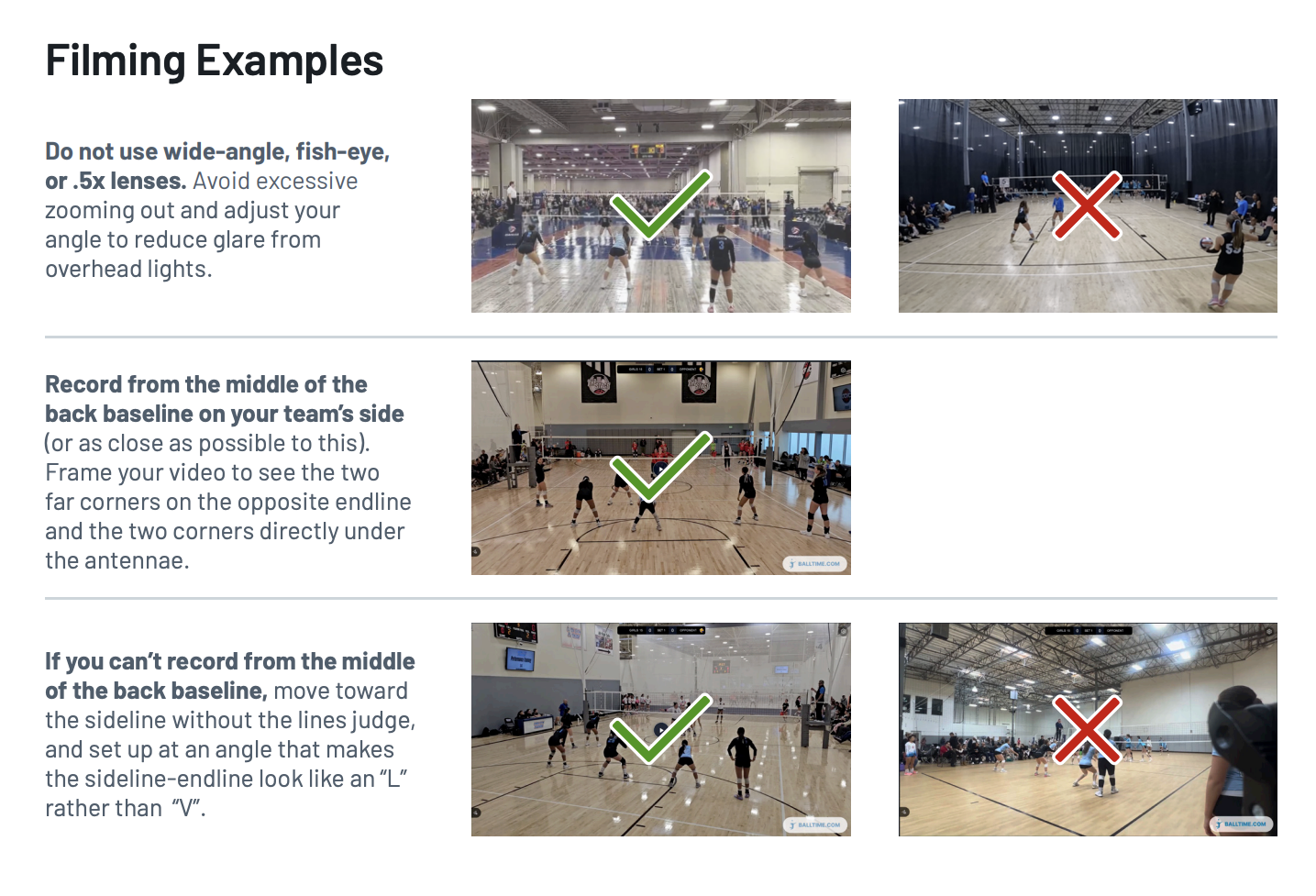
Record from the middle of the back baseline on your team’s side (or as close as possible)
Avoid obstacles such as line judges, spectators, or equipment*
Frame the court correctly:
All four corners of the opposite court should be visible
Include the two far endline corners and the two corners under the antennae
Use a tripod:
Minimum height: 5 ft
Recommended height: 8–10 ft
Record in 1080p resolution at 30 or 60 fps
Most newer devices default to these settings
If unsure, search how to adjust recording settings for your device
Maintain one continuous recording per set
If using the mobile app, you may pause between sets
Do not tap Save and Exit until the entire match is finished
Record horizontally using a standard lens
Do not zoom out
Avoid wide-angle, fish-eye, or .5x lenses
If livestreaming to Hudl and concerned about network stability, use a backup camera recording locally to the device
* If recording from the middle of the back baseline isn’t possible, move toward the sideline without the line judge and set up at an angle where the sideline and endline form an “L” shape, not a “V.”